Cazeus Casino Mobile App — Download for Android and Play Anywhere

Cazeus Casino does not have a dedicated app in the Google Play or App Store - but that does not limit mobile players at all. The platform offers a fully optimized mobile browser experience and a PWA (Progressive Web App) that works like a native app without any marketplace installation. You get access to the full game library, live casino, sportsbook, cashier and bonuses from any smartphone. This page covers how to set up mobile access on Android and iOS, what the interface looks like, and what to expect from the mobile experience.
Casino welcome bonus 100% up to £500 + 200 free spins
Get Startedwith bonus

Why Use Cazeus on Mobile

The mobile version of Cazeus Casino loads the full platform in your browser - no trimmed-down interface, no missing features. You get the same game catalog (8,000 to 12,000+ titles depending on region), live dealer tables, sports betting with in-play markets, and access to your cashier, bonuses, and VIP status.

The main advantages over desktop for many players:

  • Instant access from anywhere without opening a laptop
  • Touch-optimized navigation across Casino, Live Casino and Sports sections
  • The bottom panel in mobile shows Live Chat, language switcher and quick menu
  • PWA shortcut on your home screen loads the site in full-screen mode with no browser chrome
  • Deposits and withdrawals work identically to desktop - same methods, same limits

The Create Shortcut feature is what Cazeus uses instead of a native app. It generates a home screen icon that behaves exactly like an app launch button.

Visit Cazeus Casino

How to Add Cazeus to Your Home Screen

Cazeus provides a dedicated 'Create Shortcut' page with step-by-step instructions for both Android and iOS. Here is what the process looks like on each system.

Android Setup (Chrome)

The shortcut is added directly from Chrome - no APK file, no sideloading, no security permission changes needed.

Android: Add to Home Screen

  1. Cazeus registration screen on mobile

    Open Cazeus Casino in Chrome on your Android device. If you do not have an account yet, tap Register and complete the two-step form: email, password, country and currency.

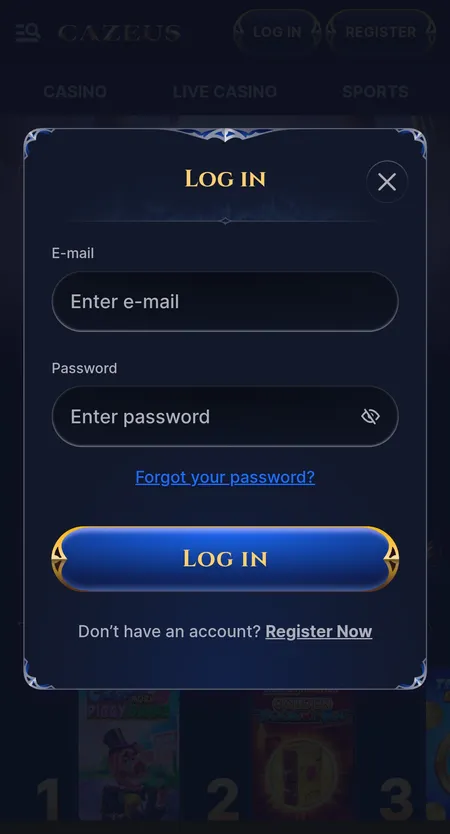
  2. Cazeus login modal on mobile browser

    Log in with your email and password. The mobile interface loads automatically - no desktop mode needed.

  3. Cazeus cashier deposit screen on Android

    Tap the three-dot menu in Chrome (top right), then select 'Add to Home Screen'. Confirm the name and tap Add. The Cazeus icon appears on your home screen and opens in full-screen mode.

iOS Setup (Safari)

On iPhone and iPad, the Add to Home Screen option is in Safari's share menu. Open the Cazeus website in Safari, tap the Share icon (square with arrow), scroll down and tap 'Add to Home Screen', then confirm. The icon will appear on your home screen and opens like an app.

Apple does not allow third-party PWA installs from Chrome on iOS, so Safari is required for this to work correctly.

The PWA shortcut on both Android and iOS gives you full-screen access to Cazeus Casino without an app store. All features - games, live casino, sports, cashier - are available through the shortcut.

System Requirements and Compatibility

Cazeus runs in a browser, so requirements are minimal. The platform works on most modern smartphones released in the last four to five years.

Requirement Android iOS
Minimum OS Android 8.0+ iOS 13+
Browser Chrome 90+ Safari 14+
Internet Stable 4G or Wi-Fi Stable 4G or Wi-Fi
Storage (PWA) Under 5 MB Under 5 MB

For live casino and live sports, a stable connection matters more than device specs - a basic 4G signal handles streaming tables without issues.

Play at Cazeus Now

Registration Inside the Mobile Interface

New players can register directly from the mobile browser or PWA. The process takes under two minutes.

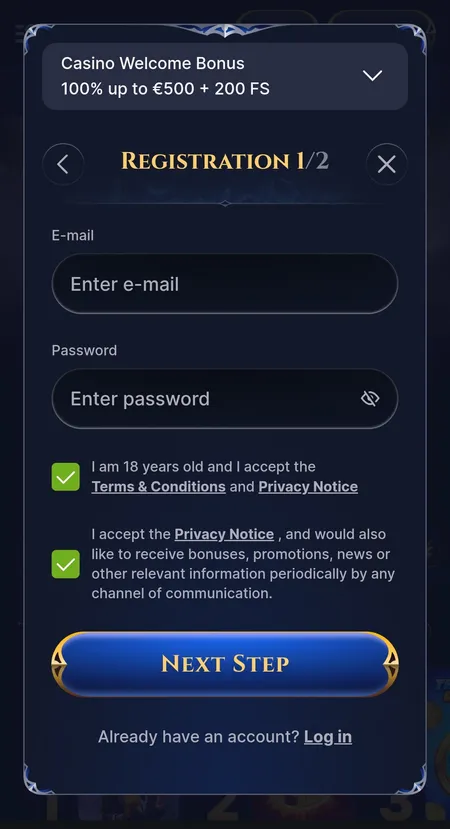
The registration form is split into two steps. Step one asks for your email address, password, and confirmation that you are 18 or older. Step two asks for your country of residence and preferred account currency. Cazeus supports a wide range of currencies including EUR, USD, GBP, NOK, PLN, CAD, AUD, BRL and others.

One account per person is the platform rule - this applies across devices and households. After completing registration, a welcome bonus selection screen appears where you can choose between the casino welcome offer (100% up to 500 EUR plus 200 free spins), the sports welcome offer (100% up to 100 EUR), a promo code field, or no bonus. You can read more about all current offers on the Cazeus Casino bonuses page.

Cazeus Casino mobile registration form step one

Step 1 of registration on mobile: email, password, age confirmation checkbox and a preview of the welcome casino bonus offer.

Bonuses Available on Mobile

Every bonus available on desktop is also accessible through the mobile interface. There is no mobile-only restriction or separate bonus path. After your first deposit (minimum 20 EUR for the casino welcome package), activate your bonus in the My Bonus section of your profile.

Key offers accessible from mobile:

  • Welcome Casino: 100% up to 500 EUR plus 200 free spins, 35x wagering on deposit plus bonus
  • Welcome Sports: 100% up to 100 EUR, 6x rollover on single bets at odds 2.00 or higher
  • Weekend Reload: 50% up to 800 EUR plus 80 free spins
  • Daily Cashback: up to 15%; Live Cashback up to 25%
  • VIP Program: 5 levels with increasing cashback rates, higher withdrawal limits and a personal manager at top levels

Free spins from the welcome package are distributed in batches (20 per day). The Wheel of Fortune mechanic, Challenges and the Coins shop are all accessible from the mobile menu.

Open your account at Cazeus Casino and claim the welcome bonus - the full offer is available on mobile from day one.

Sports Betting and Live Casino on Mobile

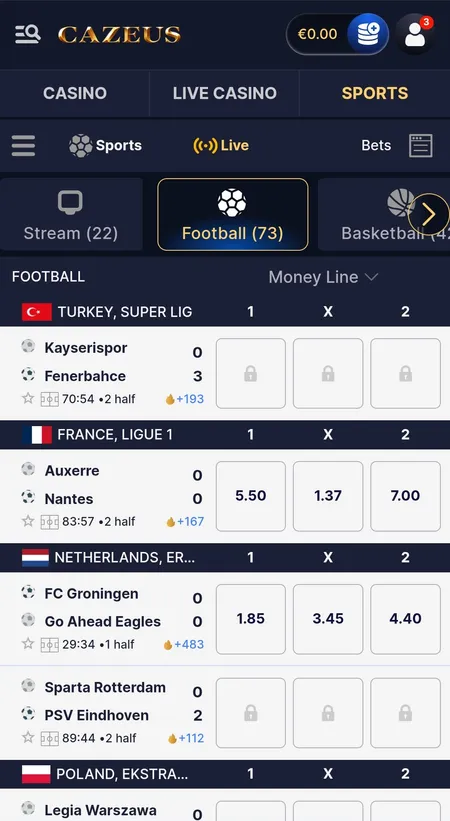
The sports section on mobile is structured around three tabs: IN PLAY, POPULAR BETS and UPCOMING. A horizontal sport selector at the top lets you switch between Football, Basketball, Tennis, Esports and other markets. Live scores update in real time - for basketball you see the current quarter and game clock directly in the bet list.

Odds are displayed in decimal format. Some markets may be locked during live events (shown with a padlock icon). Combined bets and express options are available. For more detail on the sportsbook, visit the Cazeus betting page.

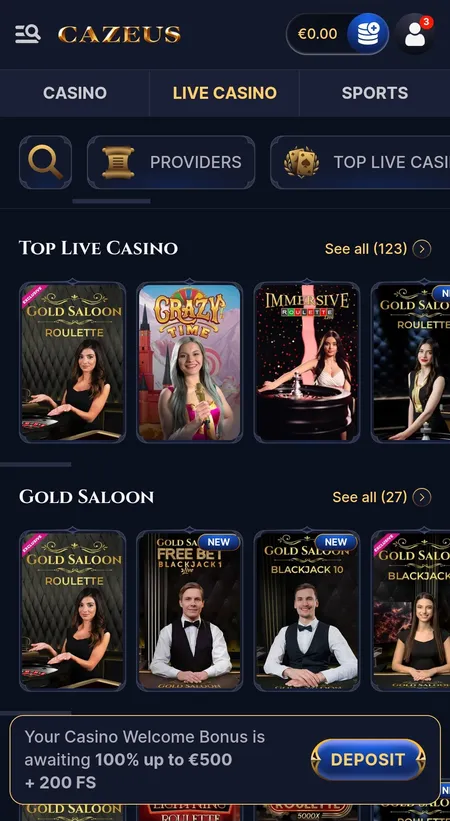
The Live Casino lobby on mobile shows Top Live Casino and Gold Saloon rows with table previews. Studios from Evolution Gaming and Pragmatic Play provide most of the live content - roulette, blackjack, baccarat, game shows like Crazy Time. Tables load within seconds on a decent connection.

Cazeus live casino lobby on mobile

Mobile live casino lobby showing Top Live Casino row and Gold Saloon section with Crazy Time and roulette table previews.

Cazeus sports live betting on mobile

Mobile sports section with live match list, Money Line market selector and real-time odds for football and basketball.

Payments on Mobile

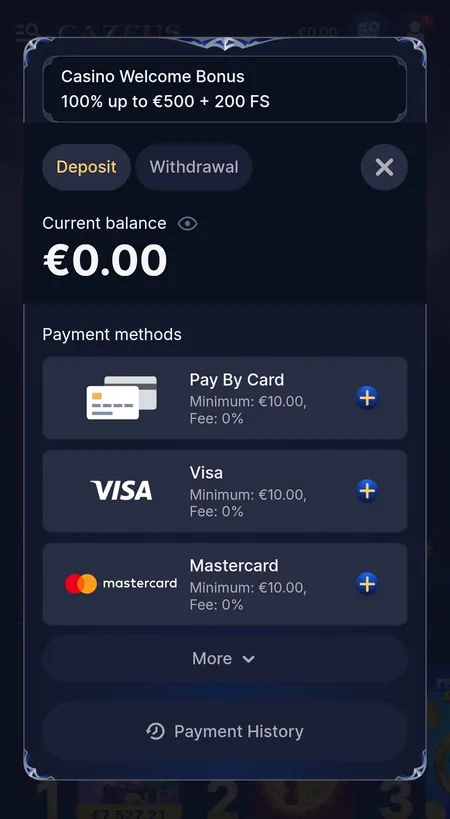
The cashier on mobile has two tabs: Deposit and Withdrawal. All payment methods available on desktop work identically through the mobile browser.

Method Min Deposit Min Withdrawal Max Withdrawal
Visa / Mastercard 10 EUR 10 EUR 3,000 EUR
Skrill / Neteller 10 EUR 10 EUR 5,000 EUR
Bitcoin 30 EUR 60 EUR 5,000 EUR
USDT / USDC / Other crypto 10 EUR 10 EUR 5,000 EUR
Bank Transfer 10 EUR 10 EUR 5,000 EUR

All transactions carry 0% platform fee. Deposits are credited quickly - Cazeus recommends waiting up to 2 hours before contacting support if a deposit does not appear. Withdrawal processing takes up to 3 business days; bank transfers may add another 3 to 5 days. KYC verification is required before the first withdrawal.

Cazeus cashier deposit view with payment methods

Mobile cashier deposit screen: Pay By Card, Visa, Mastercard options with minimum amounts and 0% fee labels.

Make Your First Deposit

Security on Mobile

Cazeus uses SSL encryption for all data transmitted through the mobile browser and PWA. Transactions go through the same protected channels as on desktop. Account security includes standard KYC (identity document, proof of address, payment method confirmation) and AML procedures triggered at defined thresholds.

There is no separate 2FA app required - account access is managed through your email and password with the option to contact support for security changes. Session data is tied to your account, so logging out from one device does not affect another active session.

The platform operates under a PAGCOR license (Philippines) with additional offshore licensing depending on region. Players aged 18 and over only. Tools for responsible gaming - deposit limits, self-exclusion, session limits - are available through the support team and the Responsible Gaming section.

Cazeus Casino does not have a dedicated Android APK or iOS App Store listing. The mobile experience is delivered through the browser and PWA shortcut. If you see third-party sites offering a Cazeus APK download, treat them with caution - use the official domain only.

Updating the Mobile Version

Because Cazeus runs as a web application rather than an installed native app, updates happen automatically on the server side. Every time you open the PWA shortcut or browser tab, you are loading the current version of the platform.

There is no manual update process, no APK re-download and no app store update prompt. If the interface looks different after a platform update, that is expected - the shortcut on your home screen always reflects the live version.

If the PWA shortcut stops working after a major platform change, the fix is simple: delete the shortcut and re-add it from the current site.

FAQ

Does Cazeus Casino have an Android app?

There is no APK or Google Play listing. Cazeus offers a PWA that you add to your Android home screen from Chrome. It opens in full-screen mode and covers all platform features.

Can I use Cazeus on iPhone?

Yes. Open the site in Safari on iOS, tap the Share button, then 'Add to Home Screen'. The shortcut works like a native app. Chrome on iOS does not support PWA installation.

Is the mobile version free to use?

Yes. There are no fees for using the mobile interface. Standard data charges from your mobile provider apply when not on Wi-Fi.

Are all games available on mobile?

The full catalog - slots, live casino, table games and the sportsbook - is available through the mobile browser. Some titles from specific providers may be region-restricted.

Do mobile players get the same bonuses?

Yes. All welcome offers, reloads, cashback and VIP rewards apply equally to mobile users. There are no mobile-exclusive restrictions.

How do I contact support from mobile?

The LIVE CHAT button is in the bottom navigation bar of the mobile interface, next to the language switcher. Support is available 24/7.

What should I do if the PWA shortcut stops loading?

Clear your browser cache, delete the existing shortcut and re-add it from the Cazeus website. If the issue persists, contact support via live chat.

Is my payment information safe on mobile?

Yes. Cazeus uses SSL encryption on all pages. The cashier on mobile is the same secure environment as on desktop.

Can I register from my phone?

Yes. The two-step registration form is fully functional on mobile. You can sign up, verify your account and make your first deposit entirely from your smartphone.

What is the minimum deposit on mobile?

The standard minimum deposit is 10 EUR for most payment methods (30 EUR for Bitcoin). To activate the casino welcome bonus, the minimum first deposit is 20 EUR.

The full Cazeus Casino experience is available right now on your phone - no download required. Add the shortcut and start playing in under two minutes.